Welcome to ClimaLinks UI
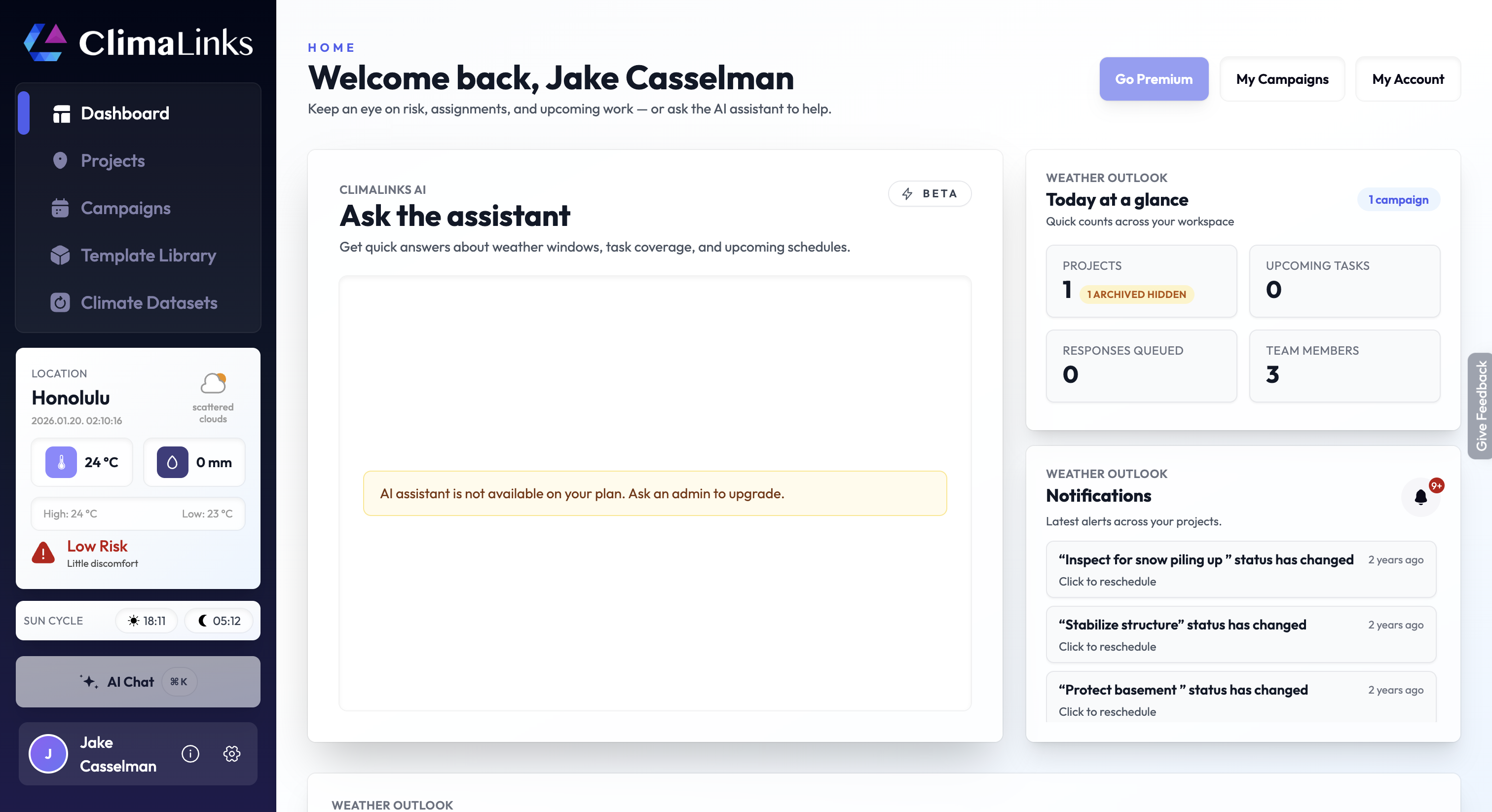
Welcome to ClimaLinks WRM -- your customized weather solution. ClimaLinks WRM revolutionizes your interaction with weather data by converting raw meteorological information into personalized indices. To familiarize yourself with our platform, please take a look at the UI tour below.
Sidebar Features
Discover the core functionalities of ClimaLinks through the left-hand sidebar. Each section serves a specific purpose, from providing a centralized dashboard of climate-related activities to managing projects, campaigns, and datasets.
- 1. Dashboard: A centralized snapshot of your climate-related activities and data.
- 2. Projects: Organize and track your active workstreams.
- 3. Campaigns: Manage initiatives and related outreach in one place, including multisite programs.
- 4. Template Library: A repository of pre-defined templates to kickstart your projects, with the option to create your own.
- 5. Climate Datasets: Browse and access available climate data sources.
Utility Widgets and Tools
In addition to the menu bar, ClimaLinks offers a range of handy tools and widgets to enhance your experience. From the Site Weather Widget for quick weather updates to the top-right actions and alerts, these features are designed to keep you informed and efficient (see the UI overview above).
- 1. Site Weather Widget: Conveniently placed to offer a quick glance at the current weather, ensuring you're always informed.
- 2. Quick Actions & Notifications: Top-right shortcuts (Go Premium, My Campaigns, My Account) plus the notifications panel keep key updates in view.
User Settings and Support
Customize your ClimaLinks experience and access support options through the User Settings and Support area. Use the profile row at the bottom of the sidebar to access account details and settings, and the feedback button on the right edge of the screen to send feedback, report issues, or suggest improvements. We're here to assist you every step of the way.
- 1. User Profile & Settings: The profile row in the bottom-left opens account details and settings.
- 2. Feedback Button: The floating feedback control on the right edge sends feedback or reports issues.
These features are designed to make your navigation and utilization of ClimaLinks as intuitive and efficient as possible. Should you have any inquiries or require further assistance, the feedback button and our support channels are always at your disposal.